
Appearance
What is Daemon?
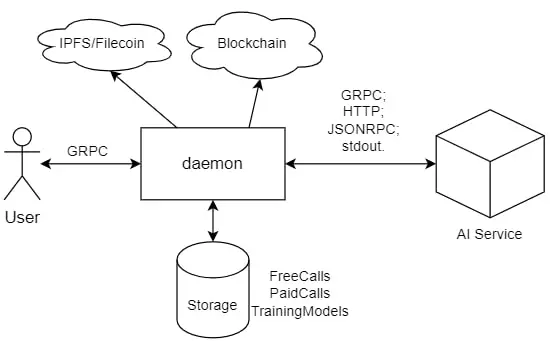
The Daemon is a critical infrastructure component that acts as an adapter between AI services and clients on the SingularityNET platform.
Core Functionality
Primary Responsibilities
The Daemon performs several essential functions:
- Request Routing - Receives client requests and forwards them to the appropriate AI service
- Payment Tracking - Monitors service calls and calculates costs in real-time
- Protocol Adaptation - Supports multiple service protocols (gRPC, HTTP/JSON-RPC)
- Free Call Management - Tracks and validates free trial calls
- Security Gateway - Acts as the public-facing entry point for all service requests
Architecture Overview
Key Components
Public Endpoint
- Must be accessible from the internet
- Handles incoming client connections
- SSL/TLS support for secure communication
Payment Processor
- Validates payment channels
- Verifies sufficient funds
- Updates channel state off-chain
Service Connector
- Connects to backend AI services
- Supports multiple protocols
- Handles service discovery
State Management
- ETCD integration for distributed state
- Channel state synchronization
- Transaction logging
Deployment Requirements
Infrastructure Needs
- Public IP Address or domain name
- Open ports for client connections
- SSL certificates for HTTPS endpoints
- ETCD instance for state storage
Configuration Options
The Daemon supports flexible deployment scenarios:
- Standalone - Single daemon instance
- Clustered - Multiple daemons with shared ETCD
- Load Balanced - Behind reverse proxy or load balancer
- Containerized - Docker/Kubernetes deployment
Getting Started
Quick Links
- Setup Guide: Daemon Setup Documentation
- Architecture Details: Daemon Architecture
- Configuration Reference: Daemon Configuration
- ETCD Setup: ETCD Configuration Guide
Installation Steps
- Download the latest daemon binary from GitHub Releases
- Configure using the provided templates
- Deploy with your AI service
- Test using CLI or SDK
Security Considerations
Best Practices
- Always use SSL/TLS for production deployments
- Secure ETCD endpoints with authentication
- Regular security updates and patches
- Monitor daemon logs for suspicious activity
- Implement rate limiting for public endpoints
Support and Resources
Documentation
Community Support
- GitHub Issues: snet-daemon repository
- Developer Forum: Community discussions
- Email Support: onboarding-support@singularitynet.io
Next Steps
Ready to deploy your service? Follow our comprehensive Daemon Setup Guide to get started with your AI service integration.