Appearance
FAQ: Bridge
1. What does the SingularityNET Bridge do?
The SingularityNET Bridge allows users to transfer tokens between the Ethereum and Cardano networks on a 1:1 basis.
⚠️ Important: Transfers are restricted to identical tokens (e.g., AGIX on Ethereum to AGIX on Cardano).
Supported tokens include:
- AGIX
- NTX
- FET (ASI)
- WMTX
- RJV
- CGV
2. How long will it take for the conversion to complete?
The Bridge is moving tokens across two Blockchains and consequently will take a few minutes to complete, to clear their respective consensus mechanisms. If the chains are congested, conversion may take longer.
In all cases, you can view the current state of the conversion in the Transactions tab of the Bridge.
Please always check the status of the conversion before submitting a conversion again. In most cases, the transaction has been submitted and is waiting to be finalized by the blockchains.
3. What does the Status column on the Transactions page mean?
The Transactions page lists all your conversion requests. The page first lists all the open conversions followed by requests that have been completed.
Each conversion can be in one of the following states as referenced in the Status column:
InitiatedThe conversion request has been initiated, and the Bridge is waiting for confirmations from the blockchain before moving to the Processing state. You do not have to take any action at this stage, just wait for the conversion to proceed.
ProcessingThe Bridge is minting or burning tokens as part of the conversion. You do not have to take any action at this stage, just wait for the conversion to proceed.
Ready for ClaimThis state applies to conversions from Cardano to Ethereum and indicates that the tokens have moved to the Ethereum side. To claim the tokens, initiate the claim from the page. You will need to perform a wallet operation to claim the tokens into your wallet.
Claim InitiatedThis state applies to conversions from Cardano to Ethereum and indicates that the Bridge is waiting for confirmations from the Ethereum blockchain. You do not have to take any action at this stage.
ExpiredThe conversion request has expired. This typically occurs when the first step of moving tokens fails.
- Ethereum to Cardano: This can happen if you signed for the conversion but did not complete the next step of transferring tokens.
- Cardano to Ethereum: This can happen if you created a conversion but did not deposit tokens to the provided address or deposited an incorrect amount.
SuccessYour conversion is successful, and the tokens have reached your wallet.
4. How are my coneversions sorted on the Transactions page?
The Transactions page first displays open conversions i.e., conversions that are in the Initiated, Processing, Ready for Claim or Claim initiated state.
All Successful or Expired conversion requests are then displayed sorted by the Creation time.
5. Why did I see a black popup during conversion?
When a conversion is initiated the Bridge waits to get a confirmation from the web wallet used. Depending on the blockchain this can take some time. If the Bridge does not get back a confirmation in time or if an error occurred, the relevant message is displayed on screen.
In such cases always, check the Transactions page to see the current status before you re-attempt the transfer. In some cases, it might take longer for the conversion to complete but the conversion is being processed.
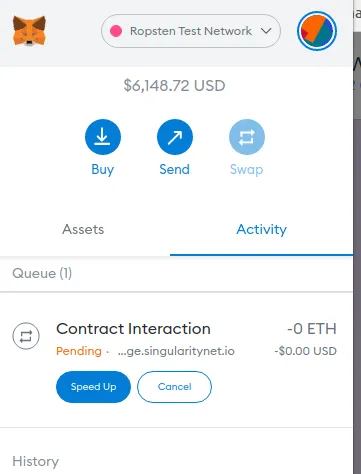
6. How do I expedite my transaction submitted on the Ethereum blockchain?
If your transaction is taking a lot of time, you may wish to speed it up as shown below: