Appearance
FAQ: Loyalty Rewards
1. How does one know they are eligible for the Airdrop?
Once you connect with your wallet and the registration window has opened , if you are eligible you would see the register button / else one would see a message directing you to further checks on eligibility criteria
2. How do I register for the Airdrop?
Once the registration window opens and you are eligible , you would see a regiser button. Please make sure you click on the button and sign from your connected wallet authorizign your registration signature.
3. How do I know if I have successfully registered for the Airdrop?
You would see a successful message and a registration receipt Id will also be shown to you, you may copy this Id for reference.
4. Can I claim if I missed registering?
One cannot claim the rewards alloted to a window, if you havent registered for that window. How does one calculate the rewards awarded to me? These details would be listed in the white paper / links from the portal spineed off.
5. Can I claim from previous windows in the current window?
Yes.
6. Is there a deadline for claiming my rewards?
Yes, you can claim all the rewards across all windows in one shot in the last claim window, however there will be a deadline to claim.
7. I have registration issues
Please use the contact us link on the portal / feel free to post your question on the communication channels launched as part of the Airdrop spinoffs. Ensure you details of the wallet / browser used and exact steps followed for us to investigate thoroughly.
8. My claim transaction is taking a very long time?
Transactions on blockchain take time, you may wish to speed up you transaction by using a higher fee.
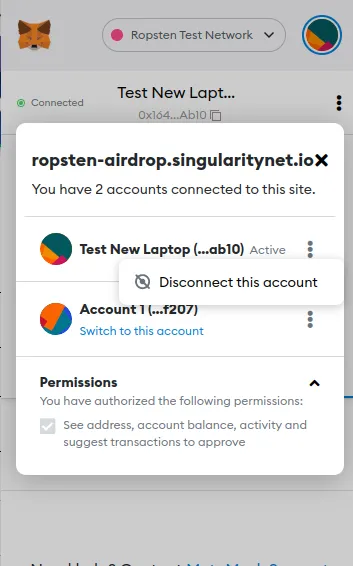
9. I am unable to disconnect my wallet on the portal
Please go the waller connected and manually disconnect the site connected.